
I just took off a pair of glasses that changed my mind.
For years, smart glasses have been a joke. We remember the awkwardness of Google Glass. We have seen the bulky headsets that make you look like a cyborg. But last week, I tried the new Google Android XR Smart Glasses prototype. Honestly? I did not want to give them back.
This isn't a review of a beta product. This is a practical look at what is coming in 2026. If you are looking to buy a pair, you need to know the truth. You need the pros, the cons, and the hard questions no one else is asking.
Here is the honest, boots-on-the-ground breakdown of the Android XR ecosystem.
The 2026 Reveal: What Actually Works?
Google learned a hard lesson from the original Google Glass. They tried to force a dream on us before the tech was ready. This time, they waited. They let the hardware catch up to the vision.
Read Also: How to Replace Google Cardboard Lenses: Easy DIY Fix?
The Google Android XR Glasses Release Date is set for late 2026. But unlike previous launches, Google is partnering with eyewear giants Warby Parker and Gentle Monster. This is a massive shift. They are treating these as glasses first and tech second.
When you put the prototype on, you barely notice the display. It is a "monocular" design, meaning the screen sits on the right lens. It sits just below your main line of sight.
You do not have to look through a tiny viewfinder. You just look at the world. The info appears when you need it.
The "Gemini" Difference
Why will these succeed where others failed? The software. The Android XR Gemini VR integration is seamless.
I tested the navigation feature. I looked at a street, asked for directions, and a tiny arrow appeared on the sidewalk in my vision. It felt like a video game cheat code.
When I looked down, the map expanded to show the whole route. It was instant. It was useful. It did not make me motion sick.
The Three Flavors of Android XR (Which One is for You?)
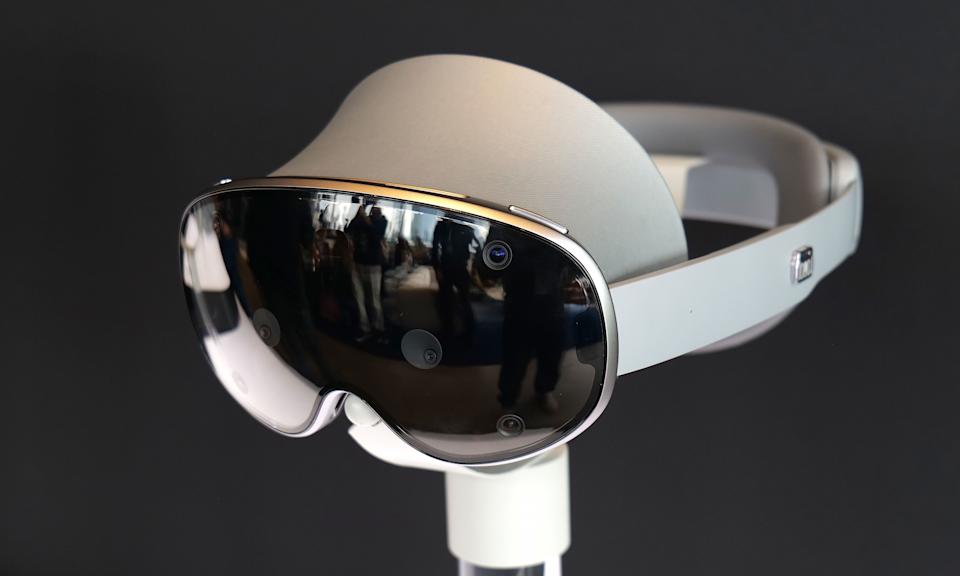
Google is not releasing one device. They are releasing a fleet. If you want to avoid a bad purchase, you need to know the difference. There are three distinct tiers coming in 2026.
1. The Audio AI Glasses (Screen-less)
Best for: Battery life purists and audio lovers.
Avoid if: You want visual navigation.
These look exactly like normal glasses. There is no display. You interact entirely through Gemini voice commands and the built-in speakers. You can take calls, listen to music, and ask questions.
They will be the cheapest option, but in my opinion, you are missing the magic. Without the visual overlay, they are just smart headphones on your face.
2. The Monocular Display Glasses (The Sweet Spot)
Best for: Daily commuters and tech enthusiasts.
Avoid if: You have low vision in your right eye.
This is the model I tried. It has a single display in the right lens. It handles notifications, translation, and Maps. The killer feature here is Live Translation.
I watched a demo where a person spoke Spanish. The English subtitles scrolled right across my view of their face. We were making eye contact, but I was reading their words. That is a superpower for travel. For most people, this is the model to wait for.
3. The Binocular & Project Aura (The Power User)
Best for: Gamers and productivity nerds.
Avoid if: You want to wear them in public without looking weird.
This tier splits into two camps. First, the "binocular" glasses have displays in both eyes. This allows for 3D viewing and a richer map experience. Second, there is Project Aura (in partnership with XREAL).
You Must Also Like: Top 3 Best Gamer Audio Headset for VR at Lowest Price
Project Aura is different. It is wired to a puck (a small computer in your pocket). It offers a massive 70-degree field of view. It is less about "glasses" and more about a "portable movie theater." You can play games or use a virtual desktop. It is heavy on the specs but light on social acceptance.
Android XR vs. The World (Apple & Meta)
You have options right now. Meta has the Ray-Bans. Apple has the Vision Pro. Where do the Google Android XR Smart Glasses fit?
Against Meta: The Ray-Bans are great for content creation, but they lack a display. Google has the screen. Plus, Android XR Glasses price points are expected to compete directly with Meta's premium tiers. If you want a heads-up display (HUD), Google wins.
Against Apple: The Vision Pro is a computer strapped to your face. It is heavy and expensive ($3,500+). The Samsung Galaxy XR headset (running Android XR) is lighter and cheaper (~$1,800).
More importantly, Android XR runs standard phone apps. You do not need developers to rebuild YouTube for you. It just works.
The Honest Cons (Don't Buy Day One)
I promised you practical advice. Here is the reality check.
Battery anxiety is real. If you use the display heavily, you might not make it through a full workday. The screen-less versions last longer, but the display models require a battery pack or frequent charging.
The "Glasshole" factor isn't gone. There is a recording light. Google has put a bright LED on the frame that pulses when the camera is active. This is good for privacy. But people will still be wary of you. Society needs time to adjust to this.
It requires a phone. These are not standalone devices (yet). They tether to your Android phone (and surprisingly, iOS via the Gemini app). If your phone dies, your glasses become dumb frames.
The display washes out in sunlight. The prototype struggled with bright windows. Google promises brighter panels for the final release, but early adopters should temper expectations for outdoor use.
The Verdict: Should You Buy the 2026 Model?
Here is my specific buying guidance.
Do not buy the screen-less audio glasses unless you just want expensive Bluetooth headphones. You will regret not getting the display.
Do wait for the Monocular Display model if you are an Android user. This is the iPhone moment for smart glasses. It is not perfect, but it is finally "good enough" to wear every day.
Do not buy the Project Aura or Binocular models as your only pair of glasses. Buy those as secondary devices for watching movies on a plane or gaming in bed. They are specialized tools, not daily drivers.
The Google Android XR Smart Glasses fix the three biggest failures of the past: design (they look like normal Warby Parkers), software (Gemini is actually helpful), and ecosystem (all your Android apps work).
We have been promised a future where computers disappear. For the first time, I looked through a pair of glasses and forgot I was looking at a screen. That is the win.
If you have $1,000–$1,500 saved up for 2026 tech, put it here. Just skip the first software update and wait for the reviews of the final battery life. This is the one to watch.